
Find the Amazon that delivers cheapest to you
Across Amazon checks the product you are viewing on up to nine other Amazon stores and ranks them by what they quote delivered to you: item, shipping and import fees, converted to one currency.
Not affiliated with or endorsed by Amazon.
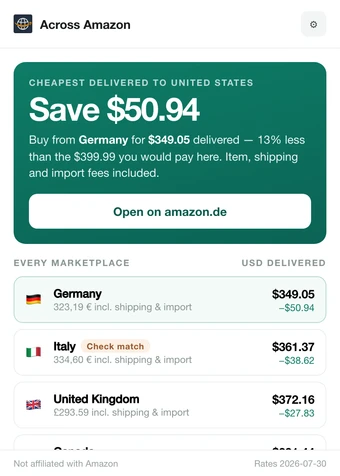
The verdict for a pair of headphones on amazon.com. Prices are illustrative.
How a check works
Nothing happens until you press the button. Opening the popup only reads the page you are on.
Open a product page
Go to a product page on any of the ten supported Amazon stores and click the Across Amazon icon in Chrome’s toolbar. The popup shows the product and its price on that store.
Press “Check 9 other Amazons”
The extension looks for the same product on each other store, first by its ASIN and otherwise by searching. Before it reads a store, it may set that store’s delivery location to the country in the “Deliver to” box of the page you started from, and leaves it that way.
Each store’s pages open briefly in background tabs that never take focus. The pages it opens are ordinary visits: they appear in Chrome’s history and, if you are signed in to Amazon, may appear in your Amazon browsing and search history.
Read the verdict and the ranked list
A check takes about 3 seconds per store. The card names the store with the cheapest delivered total and what you save against the page you are on. Below it, every store that quoted a price is ranked, cheapest first.
When a store shows no import fees for your destination, the result says so, because duties may still be due on delivery.
What the popup shows
From the product page to one store’s full breakdown. The screenshots show the real popup with illustrative prices, not real ones.
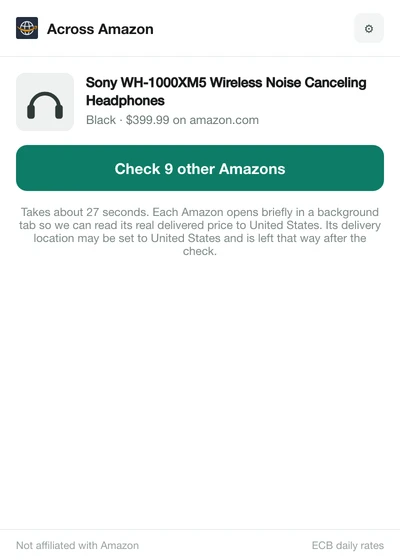
Idle. The popup reads the page you are on and shows the product, its variant and its price on this store. 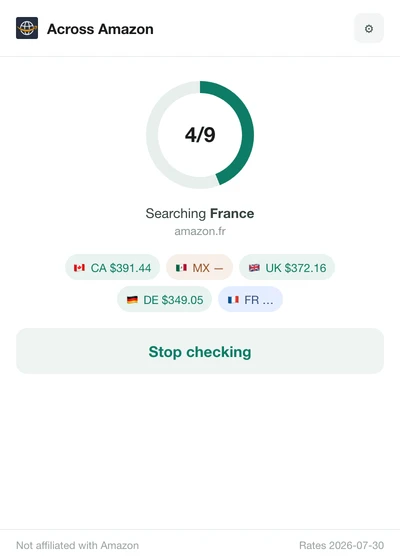
Running. The dial counts the stores checked so far. Each chip shows a store’s delivered total, or “—” when it could not be compared. 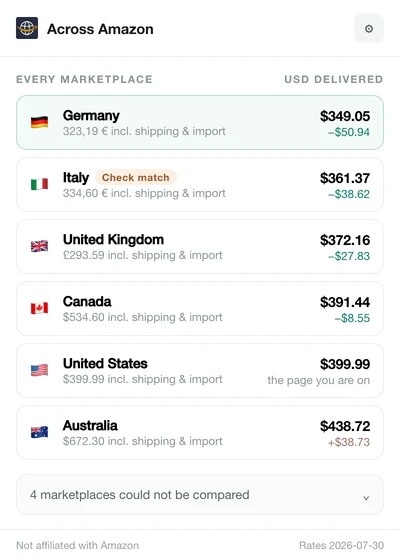
Ranked list. Every store that quoted a delivered price, cheapest first, with the difference from the page you are on. 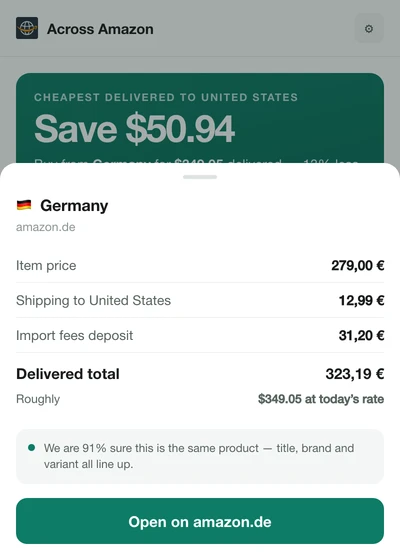
Breakdown. Click a row for the item price, shipping, import fees and delivered total, in that store’s own currency.
Ten Amazon stores
A check covers every store switched on in the settings except the one you are on, so by default the other nine. Each store prices in its own currency, and totals are converted at the European Central Bank’s daily reference rates.
- United Statesamazon.comUSD
- Canadaamazon.caCAD
- Mexicoamazon.com.mxMXN
- United Kingdomamazon.co.ukGBP
- Germanyamazon.deEUR
- Franceamazon.frEUR
- Italyamazon.itEUR
- Spainamazon.esEUR
- Japanamazon.co.jpJPY
- Australiaamazon.com.auAUD
What it never does
It reads prices and shows you where to buy. What it changes: each other store’s delivery location, explained under how it works, and the pages it visits, which appear in your browsing history. You buy on Amazon’s own product page, yourself.
Buys nothing
It never adds to cart, checks out or buys anything. “Open on …” takes you to the listing, and you decide.
No account
There is no Across Amazon account to create, and it never reads your passwords, your orders or your cookies.
No analytics
No analytics, telemetry, advertising or tracking.
No server
It has no server of its own. Your settings and past results stay in your browser, and nothing is sent to the developer. A finished check is reused for 30 minutes. An older result is deleted only when exactly the same check runs again; otherwise it stays until you remove the extension or clear its storage.
No affiliate links
Every “Open on …” link is a plain product page link.