
Opening the popup only reads the product page you are on. Nothing else happens until you press the check button, which reads “Check 9 other Amazons” with the default settings. The extension then looks for the same product on each other store, in background tabs that never take focus. A check takes about 3 seconds per store. It reads what each store charges to deliver the product to you and ranks the stores by that delivered total, converted to one currency at the European Central Bank’s daily rate.
What happens on each store
The stores are checked one at a time. For each store, the extension does this:
- Looks up your product by its ASIN. It opens the store’s page for your product’s ASIN, Amazon’s own product identifier, in a background tab. If that page shows your product and it can be bought, that is an exact match. When the store does not list the ASIN, or its listing is unavailable, it searches.
- Sets the delivery location, if needed. On the first page it opens on the store, it reads which country the store delivers to. If the store delivers elsewhere, it sets the store’s delivery location to your destination country and opens the page again, so the price it reads is quoted for your destination. The store is left that way afterwards: see what it changes on other Amazon stores.
- Searches, if the store does not list the ASIN or its listing is unavailable. It searches the store, first for the brand and model number when the title has one, then for the title, brand and selected variant. Each result is scored on how closely its title, brand and variant match your product. The best result must pass the matching threshold. Its page is then checked for your colour, pack and size. When it shows another variant, the extension opens the variant the page offers with your attributes and reads that page instead; when the page does not offer it, the store is reported as “No confident match”. A store where no result passes the threshold is reported the same way.
- Reads the prices. It reads the item price, the shipping and any import fees the page quotes for your destination. Their sum is the delivered total, in the currency the page shows. When a store shows no import fees for your destination, the total is item plus shipping and the popup says so, because duties may still be due on delivery. If Amazon shows a higher total than the sum, that total is used.
- Closes the tab. Each tab closes as soon as it has been read, and the next store starts.
While the check runs, the popup shows the results so far. The dial counts the stores finished out of the total. A line names the step for the store in progress: Opening tab, Searching, Matching product or Reading cost stack. Each finished store gets a chip with its delivered total in your display currency, or a dash when it could not be compared.
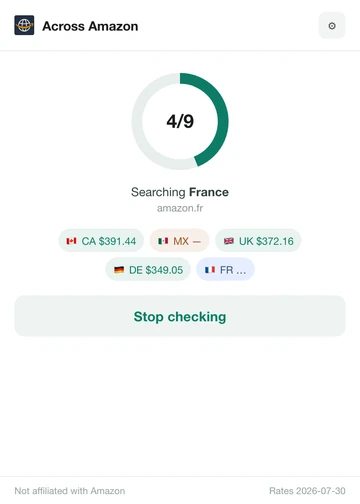
“Stop checking” cancels the run and closes any background tabs it opened. Closing the popup does not stop a check: it finishes in the background and its result is stored. Reopen the popup on the same tab to follow its progress.
When the last store is done, the popup ranks every store that quoted a delivered total, cheapest first, including the page you are on. The card at the top names the cheapest. Stores that could not be compared are listed under “N marketplaces could not be compared”, each with the reason. Press “Check again” within 30 minutes and the same result comes back at once from storage, with no tabs opened.
The pages it opens are ordinary visits: they appear in Chrome’s history and, if you are signed in to Amazon, may appear in your Amazon browsing and search history. They may also influence Amazon’s recommendations.
The two permissions it asks for
Apart from the sites in the next section, the extension asks Chrome for two permissions.
| Permission | Why it is needed |
|---|---|
scripting | The extension declares no content scripts, so none of its code runs on a page by itself. When you open the popup on one of the ten stores, and when you start a check, it injects its own packaged scripts into the Amazon tab you are on and into the background tabs it opens on the other stores. The scripts read the product, its price, shipping and import fees and the delivery destination, and set a store’s delivery country when needed. On a store page that is not a product page, the extension finds no product and keeps nothing. |
storage | Keeps your settings (which stores to check and the display currency), the result of a finished check so that checking again within 30 minutes returns it at once, and the day’s exchange rates so they are normally downloaded once per UTC day. All of it stays in your browser. |
The sites it connects to
The extension’s manifest lists twelve hosts. Its own requests go to them and to Amazon’s image servers, for the product picture shown in the popup. The pages it opens in background tabs load whatever Amazon’s own pages load, such as Amazon’s image and script servers. Nothing goes to a server of the developer: the extension has none.
| Host | Why it connects |
|---|---|
The ten Amazon stores
| The extension runs its scripts in the Amazon tab you are on and in the background tabs, which open product and search pages on the other stores. The popup uses this access to see that the tab you are on is an Amazon store, without the broader tabs permission. To set a store’s delivery country, the location script runs inside that store’s own page and sends the store’s own “Choose your location” requests to the same store. |
www.ecb.europa.eu | The extension downloads the European Central Bank’s daily euro reference rates, which convert each store’s delivered total into one currency. This normally happens once per UTC day. Only a successful download is kept, so after a failure it is tried again on the next check. |
api.frankfurter.dev | A fallback for the same daily rates, used only when the European Central Bank’s feed cannot be loaded. |
Your browser requests the Amazon pages with your own Amazon session, as if you had opened them yourself. The stores receive only what a comparison needs: your destination country in their location request, the product’s ASIN in the addresses of the product pages, and its title, brand, model number and selected variant as search terms. If you are signed in, Amazon can link these requests to your account. The exchange rate requests carry no information about you or the product. Like any web request, they let those servers see your IP address.
What it stores, and for how long
Everything is kept in the extension’s local storage in your browser: your settings (which stores to check and the display currency), the result of each finished check and each day’s exchange rates.
| What | How long |
|---|---|
| Your settings | Until you change them or remove the extension. |
| Check results | A finished check is reused for 30 minutes. An older result is deleted only when exactly the same check runs again; otherwise it stays until you remove the extension or clear its storage. |
| Exchange rates | Each day’s rates are reused for that UTC day. They stay until you remove the extension or clear its storage. |
A stored result holds the product details read from the page you are on, each store’s prices and the exchange rates used. Some of those details can be personal: the “Deliver to” text, which for a signed-in user can hold a first name, a town and a postcode; the page address, which can carry your Amazon search terms; and your destination country.
Nothing the extension stores is sent to the developer or to anyone else. To delete it, see how to delete your data.
What it changes on other Amazon stores
Other stores’ delivery location may change
Before it reads a store, the extension may set that store’s delivery location to the country in the “Deliver to” box of the page you started from, and leaves it that way.
A delivered price only compares with yours when every store quotes the same destination, so a store that delivers elsewhere is set to your destination country before it is read. When that country is known, a note in the popup says so before you start.
- How. On the first page it opens on a store, the extension reads which country the store delivers to. If that is already your destination country, nothing is sent. Otherwise it makes the same two requests the store’s own “Choose your location” box makes, from that page and in your own browser session: it loads the location form, taking only its security token and list of countries, then submits your country. Each store is set at most once per check.
- Only a country. It never sets a name, town, postcode or address. Your saved addresses, cart and orders are not touched, and nothing is ever bought.
- Left that way. The extension never restores the previous location. Your own tabs on that store show the new one after their next reload, and later checks find the store already set.
- Not the store you started from. Its delivery location is never changed.
- Country, not address. When the page you are on shows a town and a postcode, an address in that store’s own country, the other stores are set to that country. Their quotes are then for the country, not your exact address.
For example, start from a product on amazon.com with “Deliver to Switzerland”. The check sets amazon.de, amazon.fr and the other stores to Switzerland, except any store that cannot be set. A ranked store’s breakdown sheet says “Delivery location set to Switzerland” when the check changed it. Afterwards amazon.de shows Switzerland in its “Deliver to” box until you change it.
Changing it back
To change a store back, pick another location in its “Deliver to” box, at any time. Removing the extension does not change a store’s delivery location back.
When a store cannot be set to your country
A store keeps quoting its previous place when:
- its location form does not offer your country (amazon.com.au offers few countries),
- your destination is the store’s own country, which Amazon sets only by postcode, or
- Amazon refuses the change.
Its price is then for another place, so it is never ranked. It is listed under “N marketplaces could not be compared” as “Could not set delivery location”, with a note such as “This store does not offer delivery to Switzerland.”
No remote code
The extension runs no remote code. Every script it runs is bundled in its package. It injects only its own packaged files and functions into Amazon pages, and it never fetches code to run.
For everything the extension reads, keeps and sends, see the privacy policy. For short answers to common questions, see the FAQ.